
Before adding accounts receivable (AR) staff, separate invoices that need billing corrections or customer approval from those that need payment follow-up.
Use the work behind each balance to decide what to fix, automate, or assign to additional staff.
Key takeaways
- Invoice age establishes urgency; the last confirmed processing event determines the next action.
- Measure active staff time and customer waiting time separately.
- Track rejection reasons so you can correct recurring problems at their source.
- Assign unresolved exceptions an owner, next action, and follow-up date.
- Build the hiring case around measured workload, peak coverage, and decisions requiring judgment.
What will the next AR hire actually inherit?
Separate the work behind the backlog into invoice processing, customer decisions, and payment follow-up. For purchase order (PO) exceptions, establish whether Billing needs to correct the invoice or the customer's purchasing contact needs to change the PO.
A hiring brief that says “reduce overdue AR” leaves those responsibilities open. Ask a more useful question: what work would the new employee take over, and which decisions would still belong to someone else?
Review the invoices driving the backlog. Record each invoice's last confirmed event and who can complete the next step. Keep the overdue flag visible alongside any processing blocker.
Use invoice status to choose the next action
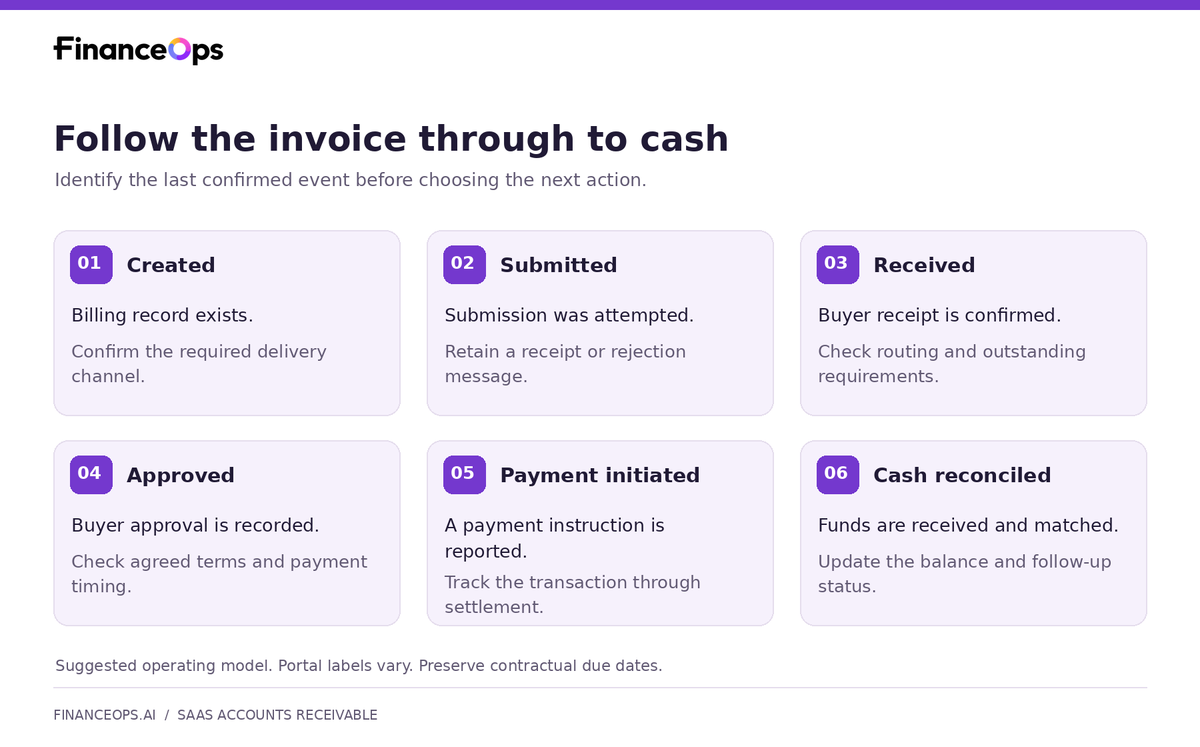
Customer procurement or accounts payable (AP) portals support the buyer's purchasing and invoice-processing workflow. Depending on the system, suppliers can submit invoices, reference POs, and check status. A seller's payment portal lets customers view balances and pay the seller.
Connect the invoice in your billing system to the evidence in the buyer's process. An internal “sent” status records your system's action. The submission receipt and buyer response establish what happened afterward.
Use the table below to assign ownership when a milestone needs action:
| Issue needing action | Resolution owner | Next action |
|---|---|---|
| Missing submission confirmation | Portal operator | Check whether the buyer received the invoice before retrying |
| Rejection caused by invoice data | Billing | Correct the data and retain the new submission reference |
| PO change or commercial dispute | Account owner and customer purchasing contact | Confirm the required decision and who can authorize it |
| Customer approval outstanding | Customer approver, coordinated through AP | Identify the pending approval and record the next follow-up date |
| Due payment without an open processing issue | AR or collections | Obtain a payment commitment and follow up on missed dates |
| Payment reported but balance still open | Cash application | Match the bank receipt and remittance to the invoice |
Apply the customer's own portal labels. Preserve the contractual due date alongside submission, approval, and payment dates; a portal status change alone does not change the agreed terms.
Four places to look before expanding the team
1. Complete customer setup before invoicing
At the Sales or Customer Success handoff, establish whether Finance can submit through the customer's required channel.
Record the channel, registration requirements, billing entity, applicable PO rules, portal administrator, and AP contact. Assign someone to confirm setup before the first submission and identify who can restore access if it fails.
This makes setup an assigned task rather than a problem the collector must rediscover.
2. Match the PO to the subscription invoice
Where a PO is required, compare its entity, covered period, line items, and remaining amount with the invoice. Check usage charges, services, and renewals when the billed amount or period changes.
Assign Billing to verify the invoiced charges and the account owner to coordinate any required change with the customer's purchasing contact. Record the confirmed mismatch, decision needed, resolution owner, next action, and follow-up date.
Follow the buyer's documented requirements; PO and renewal rules vary by customer.
3. Give rejected invoices a correction owner
Capture the rejection message, invoice and PO references, correction owner, and follow-up date.
The US Treasury's Invoice Processing Platform guidance illustrates the correction loop: inspect rejection comments, correct editable information, resubmit, and verify success. Those instructions apply to federal IPP invoices; follow the buyer's instructions for commercial accounts.
Link the original rejection to the corrected submission. Keep the invoice identifier separate from each submission-attempt reference so staff can trace changes. Before retrying a submission with an uncertain outcome, check whether the buyer already received it.
If the same field triggers repeated rejections, investigate the source data or pre-submission check. That is the recurring work to address before the next billing run.
4. Separate approval from cash receipt
Keep approval, promised payment date, payment initiation, and cash receipt as separate events when available.
For an approved invoice without a payment date, ask AP when payment is expected. Follow up when a commitment is missed. If the customer reports payment, request the remittance reference and reconcile the bank receipt and invoice allocation.
Each event gives the next conversation a purpose: identify the payment date, discuss a missed commitment, or investigate a receipt.
What the US evidence tells us
The Federal Reserve Banks' 2024 Report on Payments, based on the 2023 Small Business Credit Survey, reports that 39% of small employer firms identified slow-paying customers as a payment-related challenge. 20% identified time-consuming processes, including activities such as billing customers and making bank deposits. The chart on printed page 5 covers 4,858 respondents.
These US findings span industries. They do not quantify SaaS procurement-portal delays or establish why customers paid slowly.
For a SaaS finance leader, they provide context for examining both payment behavior and processing effort. Your own invoice history must establish which issue is driving the hiring request.
Measure the work your aging report cannot show
Track how long employees actively work on an invoice separately from how long it waits for customer action. Use active time to assess staffing demand and elapsed waiting time to prioritize escalation.
For each invoice task, record the activity, active minutes, outcome, owner, and next action. Keep the original submission date and the latest confirmed status with its timestamp. An old status needs rechecking before it drives today's follow-up.
Review three measures together:
- Active hours by task: submission, correction, status checking, and escalation.
- Rework rate: distinct invoices requiring correction divided by distinct invoices submitted in the same billing cohort, multiplied by 100. State the review cutoff and track correction attempts separately.
- Time in the current stage: elapsed time since the latest confirmed stage change. Use it to identify cases needing escalation, while preserving the contractual due date.
For a workload estimate:
Portal workload hours = submission hours + rework hours + status-check hours + escalation hours
Count each task once. If correction time includes resubmission, exclude those same minutes from the submission total.
Measure work across a full billing cycle and relevant renewal or month-end peaks. Compare that demand with available staff time after other responsibilities. Use the remaining gap to define additional capacity, and validate any proposed automation savings against the actual workflow.
Match the intervention to the work
Choose an action for each recurring task or exception:
| Evidence in the work queue | Action to evaluate |
|---|---|
| New accounts reach billing without submission requirements | Add the channel, PO requirements, portal owner, and AP contact to the customer handoff |
| The same invoice field repeatedly triggers rejection | Correct the source field and check it before submission |
| Staff repeat the same steps in a supported portal | Test automation against that portal's access rules, confirmation records, and exception routing |
| Exceptions require pricing decisions, credits, or negotiations | Assign a billing or account owner with authority to resolve them |
| Delivered, due invoices lack follow-up and no unresolved blocker is recorded | Compare internal hiring with managed first-party collections capacity |
| Customer-reported payments remain on open balances | Assign reconciliation and cash application before further payment demands |
Before adopting automation, test a successful submission, a rejection, an access failure, and an uncertain submission that needs checking before a retry. Confirm what evidence is retained and who receives unresolved cases. These are evaluation criteria for the workflow you are buying; confirm the supplier's supported tasks and integrations.
Turn the review into a hiring decision
Write the hiring brief around four findings:
- Demand: active hours by task, recurring exceptions, and peak workload.
- Capacity: hours available after the existing team's other responsibilities.
- Ownership: decisions the role can make and those requiring Billing, the account owner, or customer action.
- Success measures: fewer repeat corrections, shorter unresolved queues, and follow-up completed against agreed dates.
Review these measures for the same invoice cohort and time period. Track overdue balance alongside them: clearing an exception and receiving payment are separate outcomes.
Give the next conversation a clear purpose
Before assigning payment follow-up, share the invoice number, open balance, applied payments and credits, terms, due date, and submission evidence. Include dated status records, open issues and their owners, customer contacts, prior conversations, and payment commitments.
That context turns a general reminder into a specific request: “Can you confirm the payment date for the approved invoice?” or “Who can approve the PO amendment?”
FinanceOps Autopilot handles approved routine collections work. Evaluate it for accounts needing payment follow-up, with billing corrections and customer procurement actions assigned to their resolution owners. Confirm eligibility, supported workflows, data exchange, and escalation responsibilities before implementation.
FinanceOps first-party collections starts at a 1.5% success fee plus $1 per payment. Use the workload review to establish which accounts need that additional capacity and which outstanding actions your team or customer must resolve.