Small businesses can organize unpaid-invoice recovery without immediately building a dedicated collections team. Start with accurate invoices, a consistent follow-up process, and a clear way to handle questions and payment arrangements.
You send a reminder. The customer replies, “I thought we paid this.” Now someone needs to find the transaction, match it to the invoice, and explain the remaining balance. In a small business, that someone is often the owner.
A useful process reduces that back-and-forth and makes it clear which accounts still need attention.
What Should You Check Before Following Up?
Confirm the customer, invoice number, amount, due date, and delivery details. Review partial payments, credits, and previous replies.
Find out whether the invoice reached the right person and whether the customer requires a purchase order or other documentation. A reminder cannot resolve a missing document it never mentions.
Keep invoice-level records even when one customer has several unpaid bills. A customer ID identifies the account; an invoice ID identifies the obligation. Match partial payments and credits to the right invoice so the remaining balance is accurate.
Keep an accurate contact record. When the customer replies, attach that response to the invoice rather than leaving it in a personal inbox.
How Should the First Message Read?
Make it easy to identify the bill and explain a problem. For example:
“Hi Alex, invoice 1042 for $480 is showing as unpaid, with a due date of September 30. Could you let me know whether payment is in progress or if anything is holding it up? I can resend the invoice or help review a question.”
This is an illustrative message. Use verified details and your permitted communication process.
Avoid treating every delay as unwillingness to pay. A document issue, payment error, disputed amount, and cash-flow constraint call for different responses.
What Should Happen After the Reply?
| Customer response | Useful next step |
|---|---|
| “Please resend the invoice” | Send the verified document and confirm the destination |
| “We already paid” | Ask for or check the transaction reference and reconcile |
| “The amount is wrong” | Route the discrepancy for review |
| “We can pay next week” | Record an accepted date and follow up against it |
| “We need installments” | Review options within your approved terms |
Record the owner, next action, and review date in one shared tracker. Keep invoice corrections with the person authorized to approve them. Pause the disputed amount's routine reminder sequence while the issue is reviewed; track any undisputed balance separately.
Keep one owner and one next step for each open account. A case waiting for a correction should not drift back into the same reminder sequence.
How Do You Track a Promise to Pay?
Record the invoice, agreed amount, date, and remaining balance. On the agreed date, check the payment record before following up.
If the agreed date passes without a confirmed payment, follow up on that specific commitment. Ask whether the payment is in progress or a new blocker needs attention. Set the next review date based on the reply rather than restarting a generic sequence.
A promise is useful information, but it is not cash collected. A submitted payment may also need confirmation and correct application to the invoice.
If payment arrives with an unclear reference, resolve the match before treating the customer as unpaid. Keep that exception visible until someone completes it.
When Does Automation Make Sense?
Automation is worth evaluating when the same routine work repeats: delivering invoices, checking eligible follow-up, recording replies, and tracking commitments.
Keep your billing or accounting system as the authority for invoice amounts and adjustments. Confirm how automation receives updated balances, records replies, and handles missing or delayed payment updates. A timeout should create a check or exception, not an assumed payment result.
Before buying software, estimate account volume, staff time, invoice values, and the number of exceptions requiring judgment. A business with a handful of complex disputes may need a different solution from one with many straightforward overdue invoices.
For the technical distinction, read Agentic AI vs. Traditional Platforms.
How Can FinanceOps Help?
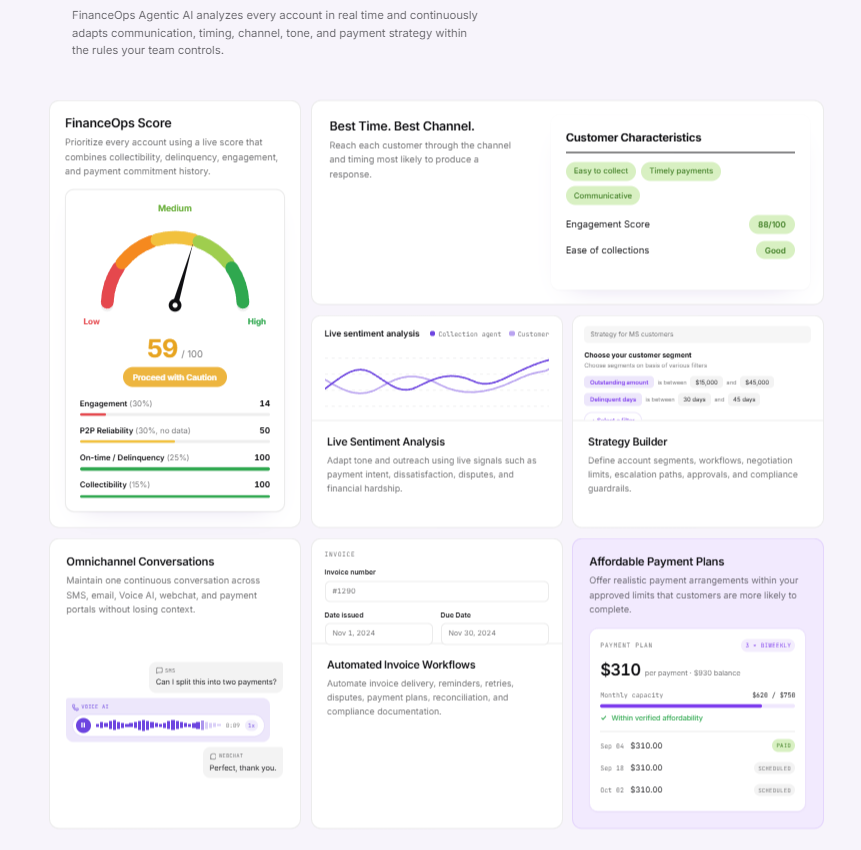
FinanceOps brings invoice workflows, customer communication, configured strategies, and payment follow-up into a connected process. Strategy Builder supports defined treatment paths, while Copilot supports staff-assisted work.
The owner or finance lead still sets authority for arrangements, corrections, and escalation. Review pricing and implementation scope against the business's volume and recovery economics.
See FinanceOps for Small Businesses for the industry workflow and review supported integrations against your current billing setup.
The aim is a process your team can operate consistently, with less routine chasing and clearer account records.
Which Numbers Should You Watch?
Track overdue cash collected and applied, open invoices, manual touches, and time to resolve questions. Review upcoming commitments separately.
Do not count credits, write-offs, or promises as recovered cash. If automation releases owner time, record that benefit separately from actual spending reductions.
Review the oldest open exceptions regularly. Those accounts often need a decision or missing information rather than another message.