A $120 overdue invoice should not require a $120 investigation.
But you know how it goes. The ledger says unpaid. The customer says “already sent.” Your bookkeeper is looking for a reference number, and you are searching an email thread between everything else you need to do that day.
One invoice is manageable. Fifty similar conversations can swallow a week.
Automated debt collection software for small businesses helps organize overdue accounts, follow up within the rules you set, record customer responses, and track payment outcomes. Its value comes from how well it handles the work around a payment, including the moments when something does not add up.
This guide will help you decide what to buy, what to test, and what to ask before signing. For practical help with your existing overdue invoices, read Recover Unpaid Invoices Without Hiring Collectors.
What should you look for first?
Look for a workflow that uses accurate billing records, acts within your limits, and changes course when a customer replies or pays. Your team should be able to resolve the remaining problems without piecing together several tools.
The final test is financial: does the work saved justify the total cost at your invoice size and volume?
The Federal Reserve Banks' 2024 Report on Payments, based on the 2023 Small Business Credit Survey, found that roughly four in five small firms faced customer-payment challenges. These included processing fees and delays as well as unpaid invoices. When you evaluate software, follow the money all the way through to the correct account record.
1. Match the software to the work taking up your time
Before comparing features, look at where your team gets stuck. Are invoices simply being forgotten? Are customers waiting for documents? Or is someone spending hours matching payments to balances?
Each problem calls for a different kind of support.
| Your situation | Useful starting point | What to evaluate |
|---|---|---|
| A few straightforward overdue invoices | Existing billing tools and a shared tracker | Whether basic scheduling solves the workload |
| Many small overdue balances with recurring follow-up | Automated collections workflow | Cost per account, current balances, response handling, and stop conditions |
| Frequent billing questions or missing documents | Collections plus exception management | Ownership, attachments, approval steps, and resolution tracking |
| Complex disputes or accounts needing legal action | Appropriate specialist review | Whether software can organize records and support a handoff |
A reminder tool schedules messages. A collections workflow also handles customer replies, payment commitments, balance updates, and the point at which somebody needs to step in.
A useful question to ask during a demo is: “What work will this take off my plate, and what will still come back to me?”
2. Start with real invoices, including the awkward ones
“Easy setup” sounds appealing when your team is already stretched. You still need a launch process that catches incorrect balances before a customer hears about them.
Bring a small sample of actual records. Include straightforward overdue invoices, but also a partial payment, a credit, a disputed charge, and a customer with several open invoices. These are the cases your team will need to handle after the demo is over.
Here is the information worth getting ready:
| Record | Why it matters |
|---|---|
| Stable customer and invoice IDs | Prevents matching the wrong account or creating duplicates |
| Invoice amount, due date, and remaining balance | Determines whether and how much is overdue |
| Payments, credits, and adjustments | Prevents collecting amounts that no longer remain due |
| Contact details and communication preferences | Supports appropriate routing and channel eligibility |
| Existing disputes, arrangements, and holds | Prevents a new workflow from ignoring an earlier decision |
| Assigned owner or escalation destination | Gives unresolved cases somewhere to go |
You do not need to clean up every historical record before starting. You do need to know which records are accurate enough for the software to act on.
Ask who will map the fields, check the opening balances, and approve the first outreach. Find out where rejected records go. If an invoice has no usable ID, your team should see the problem and know how to fix it.
Start with a limited group of accounts and someone watching the results. Expand once you have checked the balances, actions, and update process.

3. Find out what the billing integration actually does
“Connects to your accounting system” leaves a lot unanswered. It could mean a one-time import, a scheduled file, a read-only connection, or a connection that writes approved updates back.
Ask the vendor to walk one invoice through the entire process.
Which system owns the balance?
Decide which system holds the authoritative invoice balance and approved adjustments. The collections platform needs a reliable way to receive changes from it.
Suppose a customer pays through your usual payment channel while a follow-up is waiting to go out. How does the software learn about that payment, and how quickly?
Ask how fresh the data must be before outreach proceeds. If a connection fails, find out whether affected accounts pause and whether your team can see the sync problem. Continuing with an uncertain balance can create an avoidable customer conversation.
What happens when an update arrives twice?
Connections retry. People upload files again. Sometimes an older update arrives after a newer one.
Ask the vendor to show how stable IDs, duplicate detection, and update ordering prevent duplicate records or an old balance replacing the current one. Your team should not have to untangle these problems manually.
When is a payment actually “paid”?
A customer clicking the payment button is only one step. Keep these stages distinct:
- Submitted: a payment attempt has been initiated.
- Outcome confirmed: the payment system reports success, failure, or a return. A confirmed outcome does not necessarily mean cash was received.
- Applied: the payment has been allocated to the correct invoice.
- Reconciled: payment and account records agree under your reconciliation process.
Systems use different status names. Ask what each one means. A submitted payment can fail, and received cash can still be waiting to be matched to an invoice.
Watch what happens to the balance and pending outreach after each payment update. A connector that imports correctly but leaves follow-up unchanged solves only part of the problem.
4. Decide what AI can do on its own
If your bookkeeper cannot explain a control, it will be hard to use confidently.
Set the eligible accounts, approved channels, contact timing, frequency limits, and handoff points before switching on automation. Consider leaving sensitive or disputed cases out of the first launch.
A simple way to define authority is to separate actions into three levels:
| Level | Illustrative actions |
|---|---|
| Automated within approved rules | Check eligibility, send permitted follow-up, record responses, schedule a defined review |
| Requires approval | Offer an arrangement outside standard terms, change a treatment path, approve a concession |
| Reserved for authorized staff | Correct invoices, approve write-offs, resolve substantive disputes, decide specialist escalation |
A customer might ask for more time. AI may recognize the request, but any offer should stay within the terms you have approved.
Try a less straightforward reply in the demo: “We settled this last month.” The system should check the account or send the issue for review. Ask to see the account information behind its response and the rule or approval behind its next action.
Customer messages and attachments should be treated as information to review, not instructions that can override your collection rules or reveal another customer's records. Test this boundary with an out-of-policy request.
Make sure your team can pause an account, a channel, or a campaign. Check what happens to messages already waiting to be sent.
5. Test the cases your team dreads opening
Think of the last invoice that took several emails to resolve. Bring a similar case to the demo. You will learn how much work the software can handle and where your team still needs to get involved.
| Exception | What a buyer should expect |
|---|---|
| Customer disputes one item | Flag the affected amount, apply the configured hold, and assign review |
| Customer reports an external payment | Check the transaction or reference and avoid treating an unverified claim as either settled or false |
| A payment is returned | Update the outcome and route approved follow-up |
| Required documentation is missing | Assign the document task and track the next action |
| Contact details are wrong or a channel is opted out | Apply the relevant channel restriction and route correction |
| A credit changes the balance | Refresh the remaining amount before further action |
| The customer requests nonstandard terms | Route approval without implying acceptance |

For each case, you should be able to see who owns it, what happened, what evidence is available, and what happens next.
Ask the person who will use the software to work through an exception. Can they find the conversation and invoice together? Can they approve the next step and record the outcome without copying everything into another tool?
That matters to the customer too. Nobody wants to explain the same billing problem to the owner, the bookkeeper, and an automated assistant.
6. Work out the cost using your own invoice sizes
A fee that looks small on a pricing sheet can take a meaningful bite out of a $120 balance.
Ask for a written breakdown of subscription fees, setup, integrations, account or usage charges, success fees, communication charges, payment processing, and optional services. Include the time your team will spend reviewing cases.
Then ask what counts as a fee-bearing collection. Does the fee apply to all payments from enrolled accounts, or only eligible recovered cash? What happens to external payments, partial payments, reversals, refunds, and payments received after the contract ends?
Get those answers in the agreement before you launch.
What the numbers could look like
Imagine you place 200 overdue invoices averaging $120. That is $24,000 in opening overdue balances. During the measurement period, $9,600 is received and applied.
Here is a hypothetical breakdown of the cost:
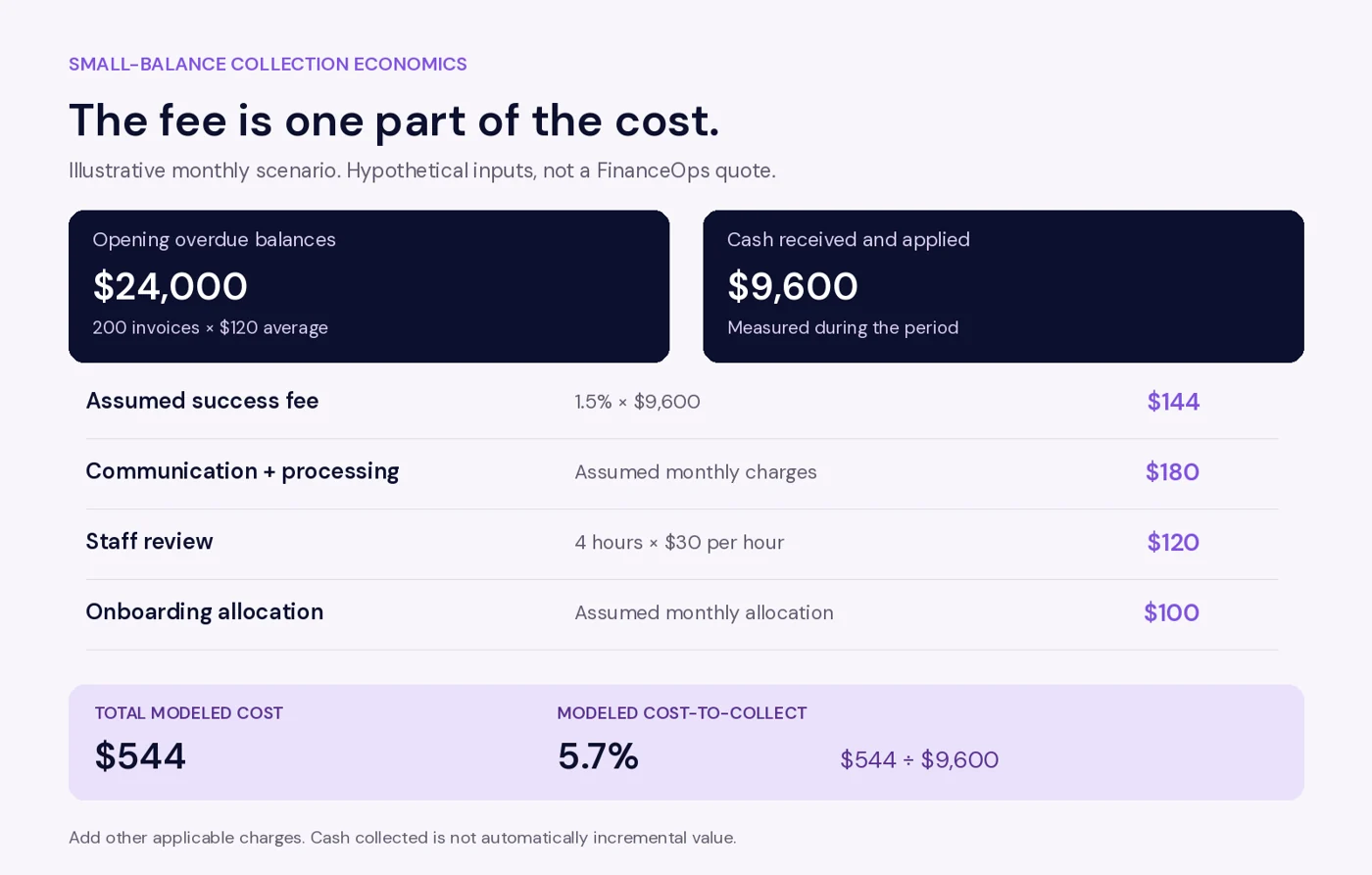
The example combines a $144 success fee, $180 in communication and processing charges, $120 in staff review, and $100 in allocated onboarding costs. Total modeled cost is $544, or 5.7% of the $9,600 received and applied. All inputs are hypothetical, not a FinanceOps quote or projected recovery result. Add any other applicable charges.
The cash collected is not automatically incremental value. Some customers might have paid without the new workflow. Compare outcomes with your baseline or a comparable cohort, and record staff time released separately from actual spending reductions.
FinanceOps' pricing page currently lists Autopilot at 1.5% of collections and identifies additional charges for certain services. Confirm current eligibility, fee treatment, and all included costs in your proposal.
7. Protect customer relationships, data, and your ability to leave
A small business selling to other businesses has a different collection context from one collecting personal or household debts.
The CFPB explains that the federal FDCPA covers certain consumer debts, excludes business debts, and generally does not cover original-creditor collection. It also notes that some state collection laws cover original creditors. Applicability depends on the debt, the parties, and the jurisdiction. A software label is not a substitute for checking your requirements.
Translate your requirements into configured controls and ownership: who may be contacted, through which channels, under what conditions, and when the case must pause or escalate.
Also ask who can view customer data, change strategies, approve adjustments, and export records. Give staff the access needed for their role. Review retention, security documentation, and incident support against your data and business needs.
Before signing, confirm whether you can export invoice history, conversations, arrangements, and open exceptions in a usable format. Ask how workflows stop and integrations are disconnected at exit. Your customer history should remain usable after the contract ends.
8. Give the pilot a clear pass or fail
Pick a fixed group of invoices and a measurement period. Include routine accounts and a few familiar exceptions so you can judge both everyday workload and problem-solving.
Agree on four outcomes before starting: balances match your billing records; payments and holds stop affected pending outreach within the agreed update window; unresolved cases have an owner and next action; and staff hours and costs stay within your budget.
If any of these fail, identify the cause and retest the affected workflow before expanding. Set the actual thresholds with your team and the vendor.
Measure cash received and applied, manual touches per account, staff hours, exception resolution time, and outreach errors. For a cohort recovery rate, divide cash received and applied during the agreed period by that cohort's opening eligible overdue balance. Keep credits, write-offs, refunds, and returned payments separately identified, and explain their treatment. A promise or a pending payment is not recovered cash.
Segment results by invoice age and balance range. A few large payments can make aggregate recovery look strong while hiding poor economics on small balances.
Ask your bookkeeper to open an unresolved account and explain the next step. If that takes a hunt through several screens, address it before adding more accounts.
Where FinanceOps fits
When the same people handle billing, customer questions, and overdue accounts, each handoff adds work. FinanceOps helps lean finance teams connect invoice workflows, customer communication, and payment follow-up.
Explore Autopilot for eligible automated follow-up and Copilot for work that needs staff involvement. With Strategy Builder, evaluate how you can define the steps an account should follow and when a person should take over. Confirm which features and configurations are available in your proposed plan.
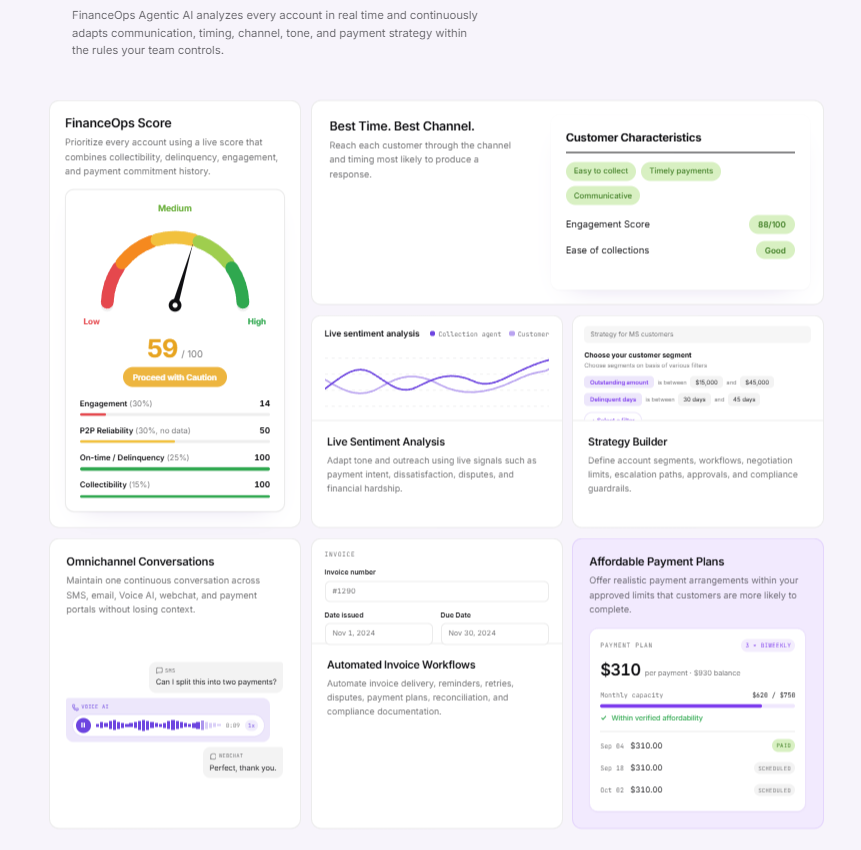
Check how FinanceOps will connect to your billing setup. Confirm the supported accounting system and edition, available data fields, refresh timing, and which approved updates can be written back.
For the demo, bring an invoice export, your collection rules, and one payment exception that recently took too long to resolve. Ask to see that case worked through from start to finish.
Choose the platform your team can operate on a busy Tuesday: accurate balances, clear limits, visible next steps, and costs that make sense. That is what makes a collections workflow worth keeping.