
AI patient collections software helps hospitals follow up on unpaid patient balances, answer billing questions, and guide patients toward approved payment options. Done well, it makes a bill easier to resolve and gives the billing team fewer routine tasks to chase.
A patient may be ready to pay and still need help. Which bill covers the hospital visit? Has insurance finished processing? Did last week's payment reach the right account? Until someone answers those questions, another reminder can feel like another problem.
For healthcare CFOs and revenue cycle management (RCM) leaders, the goal is straightforward: recover more of what is owed, make better use of staff time, and help patients get through the billing process with less frustration. Here is what to look for when choosing software.
What Do U.S. Hospital Spending Figures Show?
U.S. hospital expenditures reached $1,634.7 billion in 2024, according to the Centers for Medicare & Medicaid Services National Health Expenditure Fact Sheet, updated in June 2026. That figure covers spending across payment sources, rather than unpaid patient bills.
Inside a hospital billing office, the challenge is more personal. A small remaining balance can take several calls, a statement review, and a payment arrangement to resolve. Multiply that work across thousands of accounts, and small balances become a significant demand on your team.
What Should AI Patient Collections Software Do?
The software should help your team work out what an account needs next and carry that action through. Sometimes that means collecting a payment. Sometimes it means correcting a bill or connecting the patient with financial assistance staff.
Before comparing vendors, agree on how the software will work alongside your electronic health record (EHR), patient accounting system, payment provider, and billing team.
| System | What it handles | What to ask |
|---|---|---|
| EHR or patient accounting system | Clinical or financial records within its configured scope | Where do we find the current balance and billing status? |
| Patient payment portal | Account access and payment for authorized users | How does a patient get help when they cannot complete payment? |
| AI patient collections software | Follow-up, billing support, and approved next actions | How does a patient's reply reach someone who can help? |
| Payment provider | Supported payment transactions | How does the hospital receive and apply the payment result? |
Ask the vendor to walk you through those handoffs. Who sees the patient's question? Who can correct the balance? What happens after a payment succeeds?
If aging accounts are your starting point, Why Do Healthcare Receivables Age Despite More Follow-Up? explains how to find the underlying bottleneck.
How Can Collections Improve the Patient Experience?
Collections improve the billing experience when each conversation makes the next step clearer.
Imagine a patient receiving two bills after one hospital visit: a facility bill and a separate physician bill. They paid through one portal and assumed both were covered. Now another message says they still owe money.
The billing conversation needs to establish which account the hospital can discuss, explain the payment record it can see, and help the patient reach the right team for the other bill. Guessing at a combined balance would make the confusion worse.
Three things matter here:
A clear explanation. Can the patient understand who sent the bill, what it covers, and how the amount was calculated?
A workable next step. Can they pay, ask about an approved plan, or speak with someone about a billing or assistance question?
A conversation that carries forward. If they switch from a text message to a call, does the next person know what they have already explained?
That last point is easy to underestimate. Repeating a billing problem adds work for the patient and the person trying to help. Omnichannel Healthcare Collections AI: Never Forget a Patient Conversation explores how to keep that context together.

Which FinanceOps Features Should Hospitals Evaluate?
Start with the tasks your team handles every day. Then ask FinanceOps to show how each feature helps with one of those tasks, using a realistic account example.
| Everyday task | FinanceOps feature | What to see in a demo |
|---|---|---|
| Reach a patient through a suitable channel | Best Time, Channel, Person | How preferences, permissions, and contact history guide outreach |
| Notice when a conversation needs extra care | Live Sentiment Analysis | Which cues are surfaced and when staff step in |
| Pick up a conversation without starting over | Two-way omnichannel communication | History and open questions carried across supported channels |
| Decide what the AI agent is allowed to do | Strategy Builder | Your rules, approval limits, and escalation paths in action |
| Help a patient follow an approved schedule | Flexible payment plans | Installments, payment outcomes, and handling of missed payments |
| Respond to a changed balance or account status | Automated Invoice Lifecycle | How a received update changes the next follow-up |
| Decide which accounts need attention | FinanceOps Score | The inputs used for prioritization and how staff review them |
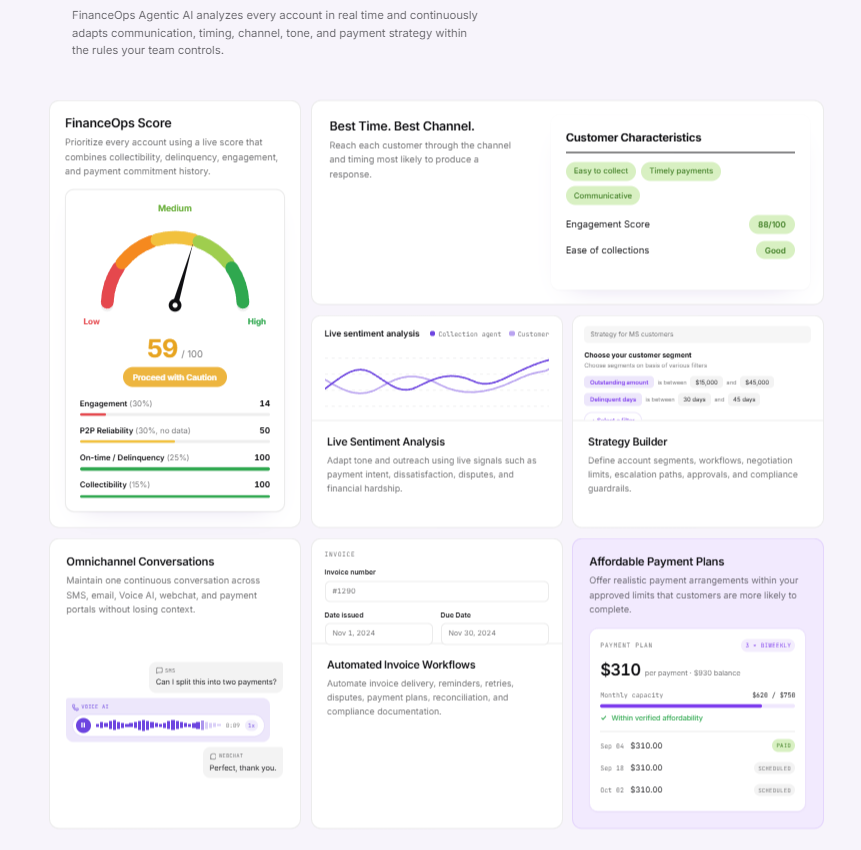
A change in tone may help staff recognize that a conversation needs care. It does not establish whether someone qualifies for financial assistance. Ask how sentiment signals reach a reviewer and how open disputes or assistance requests affect the next action.
Your team should also know which channels and account data are included in the proposed setup. Compare Autopilot for routine outreach with Copilot for staff-assisted conversations, based on where your billing office needs help.
How Should Collections Connect With Patient Payments?
When a patient pays, they want to know the payment went through and their bill reflects it. Your team needs to be able to verify both.
Follow one test account from the conversation to the ledger:
- Confirm the identity of the patient or authorized guarantor.
- Check the balance and the account the payment will cover.
- Offer the approved payment route or arrangement.
- Record the transaction reference and status.
- Check that the payment is applied to the correct account.
- Update follow-up so it reflects the new information.
- Assign any failed, returned, or unmatched payment to someone who can resolve it.
An approved transaction may still be waiting to settle or post. The patient-facing confirmation should describe what has actually happened.
Also test a payment made through another hospital channel. If your systems exchange daily files, there may be a gap before the collections software receives that update. Agree on how to handle scheduled messages during that gap.
For repayment basics, read What Is a Medical Payment Plan?. Explore Agentic Payments for the connection between payment handling and reconciliation.

See How This Could Work for Your Team
Explore FinanceOps for healthcare, or read how Enamel Dentistry approached small patient balances. Use the examples to identify what you would want to test in your own billing office.
What Integration Details Matter Before a Pilot?
“Integrates with your EHR” should lead to a detailed conversation. Your team needs to know what information moves between systems and what still requires a person.
Get clear answers to these questions:
- How are accounts matched? Identify the patient, guarantor, visit, billing entity, and payment references needed.
- Which record should everyone trust? Name the system that owns balances, adjustments, arrangements, and assistance status.
- How often do updates arrive? Confirm the supported APIs, events, or files and how delays are detected.
- What gets sent back? Establish which notes, statuses, and payment results return to the hospital.
- What happens when something goes wrong? Assign rejected records, duplicate updates, outages, and conflicting information.
- Who can see or change information? Define access for the AI agent and staff.
Share the information needed for the agreed billing work. Clinical information should only be included when necessary and appropriately authorized, and clinical questions should go to qualified healthcare professionals.
Name the people responsible for the pilot across patient financial services, IT, security, compliance, and the vendor. When an exception appears, everyone should know who will pick it up.
What Controls Should Hospitals Require?
Your team needs control over what the AI agent can say and do, with records that make its actions easy to review.
For protected health information, establish the vendor's role and contractual obligations. HHS guidance on business associates explains when business associate arrangements are required. Review the safeguards, access restrictions, subcontractor arrangements, and incident procedures that apply to your setup.
Financial assistance also needs a clear path. For tax-exempt hospital organizations subject to Section 501(r), IRS guidance on Section 501(r)(6) requires reasonable efforts to determine assistance eligibility before extraordinary collection actions.
Ask the vendor to demonstrate how the software:
- Checks identity and authorization before sharing account details.
- Follows approved communication content and contact preferences.
- Routes billing disputes, assistance requests, and complaints.
- Keeps payment arrangements within your approved limits.
- Records the information available, the action taken, and the outcome.
A blocked action is a useful demo moment. Your team should be able to see why it was blocked and what happens next. Strategy Builder is the place to evaluate those rules and escalation paths.
How Can CFOs Measure Recovery and Patient Experience?
Measure the money collected, the work required, and the patient's experience over the same period. More messages or payment-link clicks can show activity, but they do not tell you whether the billing problem was resolved.
| Measure | Suggested definition | What it helps establish |
|---|---|---|
| Patient cash recovery rate | Patient cash collected, net of relevant refunds and returns, divided by the agreed opening eligible balance | How much of the placed balance converted to cash |
| Cost per resolved account | Allocated software, channel, payment, and staff costs divided by resolved accounts, with outcomes identified separately | Whether resolution becomes more efficient |
| Time to payment posting | Elapsed time from the chosen transaction milestone to application on the patient account | Whether payment information reaches the ledger promptly |
| Repeated patient effort | Repeat contacts needed for the same unresolved issue | Whether patients must explain themselves again |
| Arrangement completion | Completed arrangements divided by arrangements due to complete in the period | Whether approved schedules result in payment |
| Unresolved cases | Open billing, assistance, and payment exceptions by age and owner | Whether automation creates a new backlog |
Agree on what “resolved” means before the pilot begins. Payment, a billing correction, and an assistance adjustment can all close an account, but only one represents cash collected. Keep those outcomes separate.
Where feasible, compare the pilot with a similar group of accounts. Match the starting balance, age, insurance status, existing arrangements, and follow-up period. Apply the same rules to later adjustments and exclusions.
Use FinanceOps Dashboards to see how recovery, account activity, and open cases are presented. If staff spend less time on routine work, report that capacity gain. Call it a cash saving only when spending falls or a measurable cost is avoided.
What Should You Test in a Hospital Software Demo?
Bring the awkward cases your team actually encounters. A smooth payment is useful to see; a disputed bill or a missing update reveals how much help the software will provide when the work gets harder.
Use authorized test accounts and agree on the expected result before the demonstration.
| Try this situation | Look for this response |
|---|---|
| “I thought this payment covered both bills.” | A clear explanation of billing scope and the right referral |
| A guarantor asks about a patient's account | Authorization checks before account details are shared |
| Insurance changes the amount owed | The received update changes the balance used for follow-up |
| “Can someone help me apply for assistance?” | The correct referral and your configured restrictions during review |
| An installment payment fails | An accurate status and the approved next step |
| “I paid at the hospital yesterday.” | Payment matching and revised follow-up once the update arrives |
| A staff member takes over a dispute | The conversation history, a clear owner, and a recorded outcome |
Start with a manageable pilot that includes different account types. Agree on success measures, staff involvement, costs, and review dates. Expand when the results show the process works for your hospital.
Where Does FinanceOps Fit Hospital Collections?
FinanceOps Agentic AI connects healthcare customer support and collections with approved payment options and account follow-up. The aim is to give your team more room to help patients while routine work keeps moving under your hospital's brand.
For a billing office handling small balances at high volume, that could mean fewer accounts to chase manually and clearer handoffs when someone needs help. Use the demo scenarios above to see how FinanceOps would fit your systems, policies, and team's responsibilities.
What Can Hospitals Learn From Enamel Dentistry?
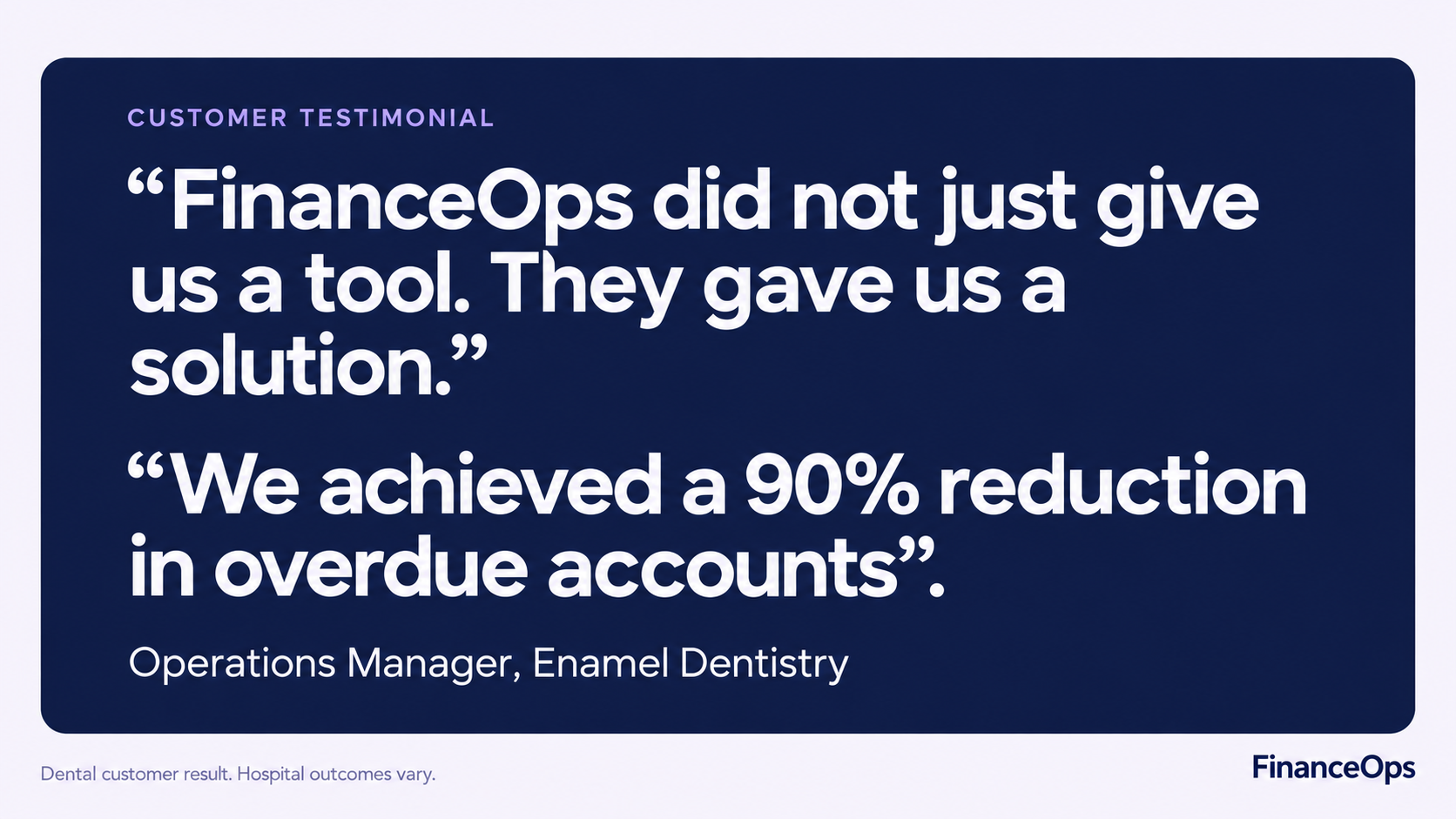
The Enamel Dentistry case study offers a relevant example of handling small patient balances with automated follow-up.
The testimonial below describes a dental customer's experience. For hospital buyers, the useful question is how that approach could apply to your workload. Compare the account types and measurement scope before drawing conclusions about likely results.
How Should Hospitals Compare Pricing?
Look at what it will cost to run the service, including success fees, payment processing, communication channels, integration work, and staff time.
The FinanceOps pricing page is a starting point. Ask for the terms and included services for your hospital's proposed scope, then compare that cost with the recovery and workload improvements measured in the pilot.